The Best Clipboard History Tool for Mac
If you are like me (the creator of this application), you love your Mac. You love all of the accessibility tools, features, and innovative progress. But, the one thing that has driven me crazy since the switch to Mac was the lack of clipboard history.
I would copy API keys, tokens, code, passwords, links, etc. over and over again. Constantly wishing I had something to allow me to go back through what I had copied previously.
That is exactly why I build Copyd. It gives Mac users a clipboard history that remembers everything you've ever copied. It also gives you tools to filter, search, and more through what you have copied before.
What Is Clipboard History on Mac?
I should probably answer this for those who have always been on Mac. Clipboard history is a built in tool on windows. What you copy can be recalled. It is pretty basic, but nice for users that copy and paste a lot.
So what does your Mac have? Well it has:
Command + C to copy.
Command + V to paste.
And that's about it. The standard clipboard is temporary. Copy something new, and the previous item is replaced. And this is pretty rough for power users.
Why Copyd Is Built for Mac Clipboard History
Copyd is a clipboard manager designed specifically for Mac. Once something is copied, Copyd keeps it available in your clipboard history so you can retrieve it later. You can search your history, organize items using filters, and click an old clipboard item to copy it again. There are a few things that make this especially useful.
1. Keep Your Clipboard History
Your copied information doesn't ever leave you. Copyd keeps your clipboard history available from when you download it to when you delete it. Everything you ever copy stays with you and available. I've been testing it for months to get it to market and have thousands already... I didn't realize how much I used it.
Think about all the things you may copy daily and need to reuse:
-
Generic text for emails
-
Links
-
Images
-
Code snippets
-
Email addresses
-
Notes
-
Frequently reused information
If you've already copied it once, you shouldn't have to hunt it down again.
2. Search Your Clipboard Instantly
A large clipboard history isn't very useful if finding something takes forever. Or at least that is what I told myself when building the search feature. And it has come pretty handy. Copyd includes instant search so you can find previous text, links, or images based on their name or content.
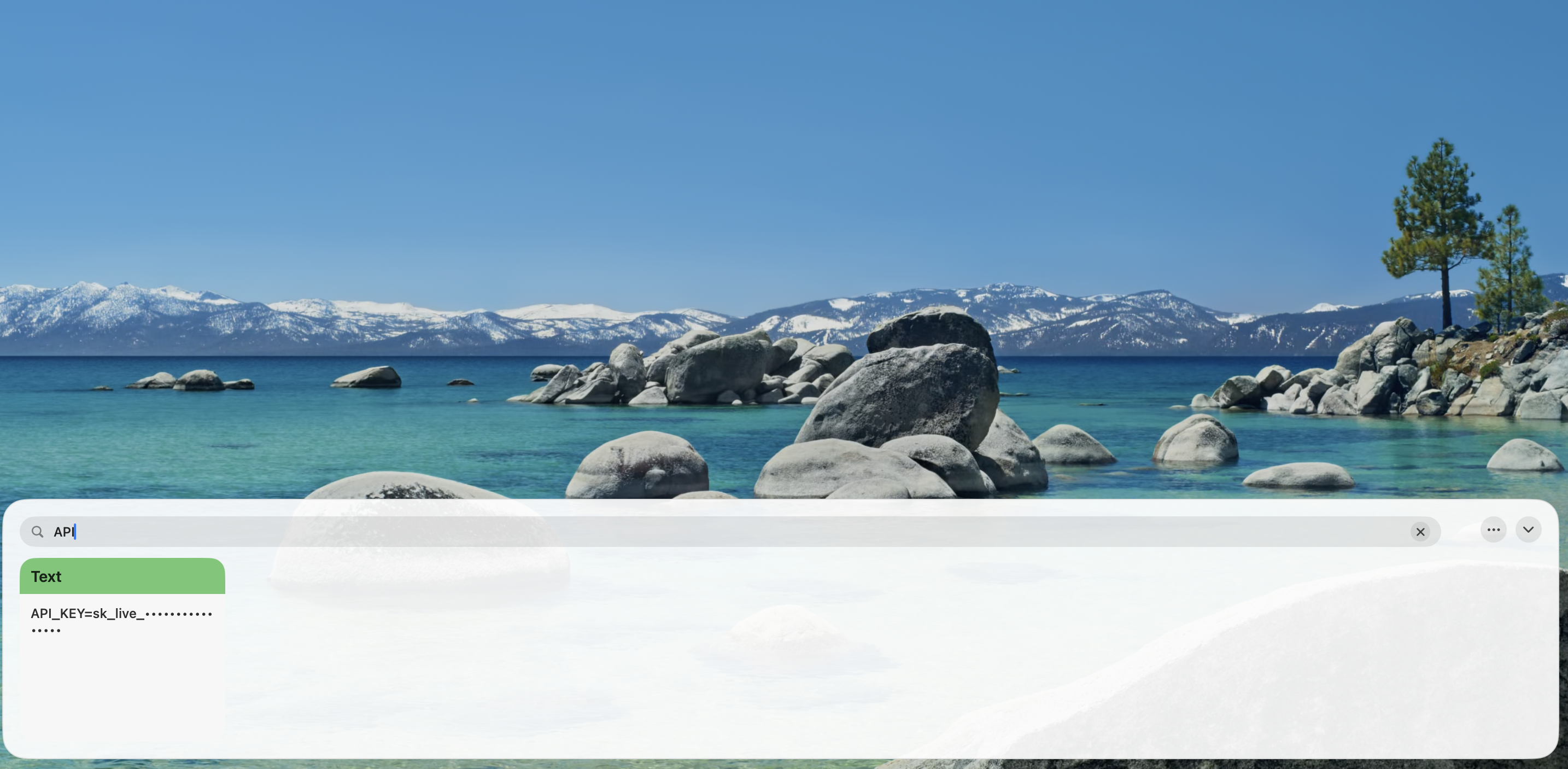
3. Organize Important Copies With Filters
This was one of my favorite things to add. A filtering system for quick and easy access. You can color code anything you've copied, add it to a filter for quick access, and always keep track of your most important copies.
I use this more than probably any other feature. I organize by passwords, API keys, code snippets, emails, etc.
A Private Clipboard Manager for Mac
This application does not send your information anywhere. Everything you copy and paste is only ever on your computer. I (the author of this blog) have no way to ever access what you copy. Plus, I don't want it or care. You can have piece of mind knowing that it is all local to you...
One other fun wrinkle: There's also no account required to use Copyd after purchasing it. That's right... in the year 2026 I don't even make you setup a password. I still do need your money to help pay for the site and improvements though. Sorry :)
Who Is Clipboard History Useful For?
Almost anyone using a Mac can benefit from clipboard history, but there are a few workflows where it becomes particularly useful.
Developers
Developers constantly move information between applications.
API endpoints, documentation links, commands, code snippets, IDs, queries, and reusable components can all disappear the moment something else gets copied.
Clipboard history gives you a quick way to retrieve them again.
Writers and Researchers
Research often involves jumping between dozens of sources.
You might copy a quote, URL, citation, statistic, or paragraph and need it again later.
Instead of keeping dozens of tabs open because you're worried about losing something, your clipboard history gives you another way to retrieve information you've already found.
Designers
Designers regularly move between Figma, browsers, project management software, Slack, and other tools.
Colors, asset links, component names, feedback, and reference material can all live temporarily on your clipboard.
A searchable clipboard makes moving between those tools much easier.
Everyday Mac Users
You don't have to be a developer or designer to benefit from clipboard history.
Maybe you copy:
-
An address
-
A tracking number
-
An email
-
A recipe
-
A message you're sending someone
-
A product link
-
A Wi-Fi password
Instead of finding the original source again, you can pull it directly from your clipboard history.
What Should You Look for in a Mac Clipboard Manager?
There are plenty of clipboard managers available for macOS. Mine may not even be the best. Here is what I personally think makes a good clipboard manager (I am a bit biased):
-
Automatically save clipboard history
-
Quickly search previous items
-
Organize frequently used information
-
Restore an old clipboard item in seconds
-
Keep clipboard data private
-
Stay out of your way when you don't need it
Why does it cost money?
Standing this up and making improvements costs money. And you buying into my product helps that. One thing I want to stress though: NO SUBSCRIPTIONS. NO HIDDEN FEES.
You pay once and get access forever. If I get hit by a bus tomorrow, you still have access. If I close up shop, you still have access. No subscription, no hidden fees, and upselling. You pay once and you get to have all the fun you want copying and pasting. Forever.
Try Copyd for Mac
The default Mac clipboard works well when you're copying one thing from one place to another.
For everything else, having access to your clipboard history can make working on a Mac significantly easier.
Copyd gives you searchable clipboard history, filters, click-to-paste access, and local storage in a native Mac application.
There are no monthly subscriptions. Copyd is sold as a one-time purchase with lifetime access, with the site currently listing it at $24.99 for a limited time.
If you're constantly copying links, text, images, code, or anything else on your Mac, stop searching for things you've already copied.
Copy it once. Find it whenever you need it.